Can I Connect my Instagram Account Without a Facebook Page?
Can I Connect my Instagram to DGTLsuite without a Facebook Page?#
Unfortunately, due to restrictions with Meta’s API, you cannot connect an Instagram Account to 3rd party apps, like DGTLsuite, without a Facebook Page.
TheGOOD NEWSis, it’s super easy to create a Facebook Page to connect your Instagram Account to directly within DGTL Account’s authentication workflow.
Navigate to the tab named ‘Connected Accounts’ in the menu on the left.
Ensure you are signed in to the Instagram you want to connect to DGTLsuite on your device.
Click ‘Add Instagram Account’ from the list. This will open up a popup from Meta to authorize the account.
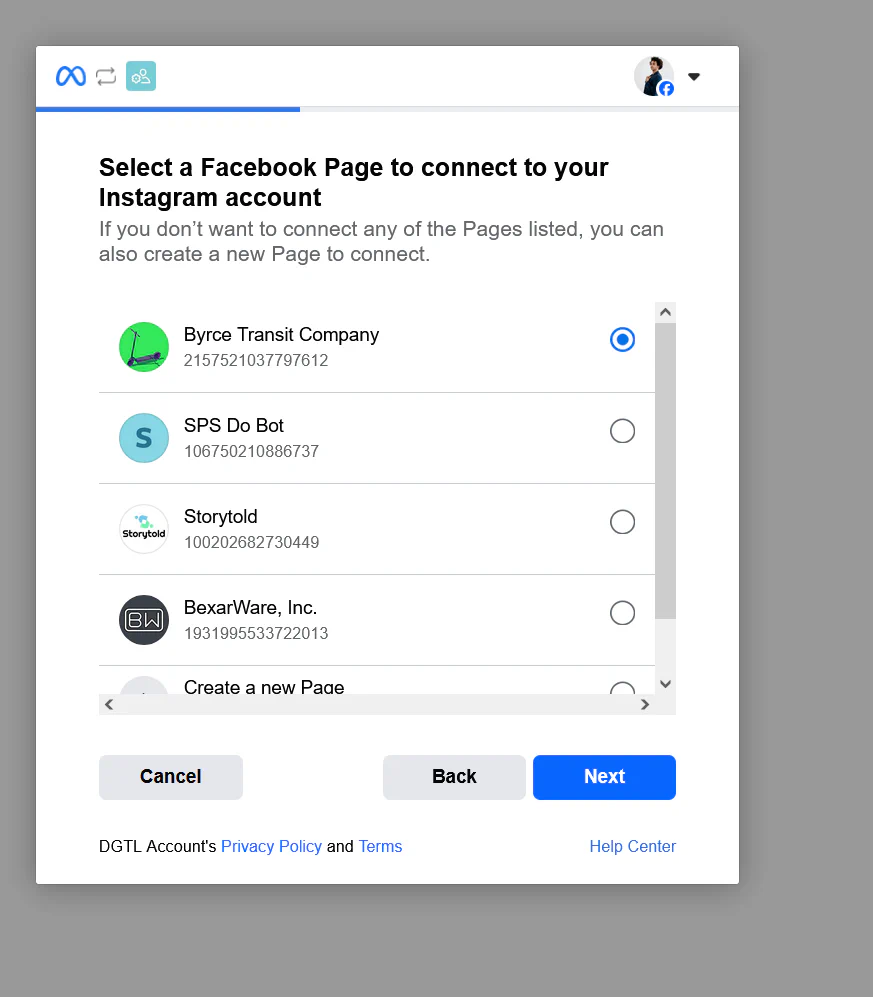
Follow the login prompts to sign into your Facebook profile and authorize DGTLsuite’s connection. This is where you’ll be prompted to either:
Connect your Instagram to an existing Facebook Page
Create a new Facebook Page to connect
Once you authorize DGTLsuite’s connection, your Instagram account and newly linked Facebook page will display within DGTL Account’s interface.
NOTE: Meta does communicate that best practice for businesses on their platform is to always link a Facebook Page to your Instagram account. Not only will this help with localized SEO searches such as showing up as a business in your geographic region, but it will also allow business owners with linked pages to take advantage of targeted advertising campaigns on Instagram and Facebook in the future.
 Can I Connect my Instagram Account Without a Facebook Page?